Introduction
AR is no longer confined to Snapchat filters and novelty demos. In 2026, it's guiding surgeons through complex procedures, letting shoppers try on shoes from their couch, and helping factory technicians diagnose equipment failures using overlaid diagnostic data — live, on the shop floor.
The business case is undeniable. According to Grand View Research, the global AR market is projected to reach $1,050.56 billion by 2033, growing at a 29.7% CAGR. That's not a niche technology — it's infrastructure.
But for business leaders trying to act on that opportunity, the path forward isn't obvious. Which type of AR fits your use case? What does it actually cost to build? Which platform should you target? The technology has moved faster than most decision-makers' ability to evaluate it — and that gap is where costly mistakes happen.
This guide gives you a clear-eyed framework for making those calls. Inside, you'll find:
- A plain-language breakdown of how AR app development actually works
- Which industries are seeing measurable returns in 2026
- Which tools and frameworks are worth your attention
- A step-by-step view of the build process
- Realistic budgets across different project types
Key Takeaways
- AR adoption is accelerating; companies that move now build advantages that are difficult to close later
- Markerless AR now dominates enterprise adoption; marker-based approaches suit specific recognition tasks
- Healthcare, retail, education, and manufacturing deliver the highest documented AR ROI
- ARKit, ARCore, and Unity/AR Foundation are the dominant build choices in 2026
- Starting with an MVP reduces upfront investment and proves business value before you commit to full-scale build
What Is AR App Development?
AR app development is the process of building software that overlays digital content — 3D models, animations, live data — onto a user's real-world view through smartphones, tablets, or dedicated headsets like Apple Vision Pro or Meta Ray-Ban glasses.
Under the hood, AR apps use a device's camera alongside sensors and computer vision algorithms to interpret the physical environment. As Google's ARCore documentation explains, the system identifies visually distinct feature points in camera frames, combines them with inertial sensor measurements to estimate device position and orientation, then anchors digital elements to that spatial understanding in real time.
The outcome is virtual content that appears to exist in physical space — staying locked to surfaces as you move, responding to lighting and depth cues in real time.
That foundational mechanic plays out very differently depending on one key architectural choice: whether your app needs a physical trigger or can anchor content anywhere.
Marker-Based vs. Markerless AR
Choosing the right approach shapes your entire tech stack. Here's how the two main types differ:
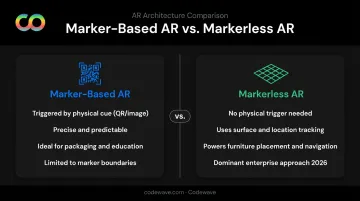
Marker-based AR is triggered by a physical cue — a QR code, product packaging, or a unique printed image. ARCore's Augmented Images feature is a good example: the app recognizes a known 2D image and responds with overlaid content. It's precise and predictable, making it well-suited for product packaging interactions, educational tools, and environments where physical markers can be controlled.
The constraint is real, though: users need the marker in front of them, and experiences can't extend beyond its boundaries.
Markerless AR works without any physical cue. Using surface tracking, location data, and computer vision, apps detect horizontal and vertical planes and anchor content directly to them. This is what powers furniture placement apps, face filters, and navigation overlays. According to MarketsandMarkets, the markerless AR segment is projected to dominate the AR market from 2026 through 2032 — and for most enterprise use cases in 2026, this is the default approach.
Where AR Creates Real Value: Industry Use Cases in 2026
AR earns its development budget when it solves a real operational problem. These four verticals have the most documented evidence of business return.
Healthcare
AR in healthcare has moved well past proof-of-concept. A 2024 study published in Scientific Reports found AR guidance significantly improved orthopedic drilling accuracy compared to freehand methods, particularly for oblique trajectories (p < 0.001). In surgical planning, institutions are comparing HoloLens 2, tablet AR, and 3D printing as complementary tools for complex procedures.
Medical education is seeing equally strong results. Case Western Reserve University's HoloAnatomy Software Suite — built using Microsoft HoloLens — allowed students to cover required anatomy content with 40% less classroom time than traditional dissection-based learning, while achieving equivalent outcomes.
For health systems stretched on budget and staff, that efficiency gain translates directly to training more clinicians at lower cost — without sacrificing learning quality.
Retail and E-commerce
The retail case for AR is backed by conversion data. Shopify reports that Rebecca Minkoff shoppers were 65% more likely to place an order after interacting with a product in AR, and Gunner Kennels saw a 40% increase in order conversion alongside a 5% drop in return rates after adding AR product visualization.
Consumer preference reinforces this. A Deloitte Digital and Snap study found that companies offering branded AR experiences were 41% more likely to be considered by shoppers. Nearly 3 in 4 consumers said they'd pay more for a product when using AR to evaluate it.
Virtual try-ons (eyewear, apparel, footwear) and in-home furniture placement tools lead on conversion impact — making them the highest-ROI formats for retail AR investment.
Education and Training
Beyond medical education, AR is transforming vocational and industrial training. A 2024 peer-reviewed article in the CIRP Journal of Manufacturing Science and Technology confirms AR-based training reduces learning time, lowers cognitive load, and supports knowledge retention versus traditional methods.
Practical applications include:
- Welding and machinery maintenance training with real-time instructional overlays
- Aviation mechanics training simulations
- Onboarding programs that compress weeks of classroom content into days of interactive practice
Across enterprise deployments in manufacturing and logistics, immersive AR training programs have delivered 2x faster onboarding and 60% reduced training costs — outcomes that matter most in industries with high technician turnover or complex certification requirements.
Manufacturing and Field Operations
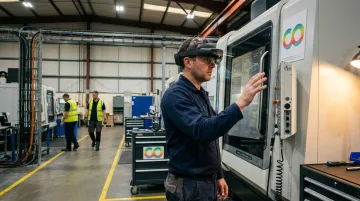
AR overlays that place step-by-step instructions directly onto equipment — in the technician's field of view — reduce errors and accelerate complex tasks. DHL's warehouse AR pilot with Ricoh in the Netherlands improved picking efficiency by 25%. A 2025 study in Production & Manufacturing Research on AR-assisted rolling-stock failure analysis found AR support improved decision-making and reduced task errors in maintenance workflows.
For transportation, energy, and heavy manufacturing — sectors where a single maintenance error can trigger costly downtime — those numbers translate directly to operating margin.
AR Development Tools and Tech Stack for 2026
Choosing the right tools early prevents costly rebuilds later. Here's how the landscape breaks down.
Native SDKs: ARKit and ARCore
Apple ARKit is the go-to for iOS and visionOS development. Core capabilities include:
- Plane detection (horizontal and vertical surfaces)
- Face and hand tracking
- Image and object tracking
- LiDAR-powered scene reconstruction on Pro devices, enabling real-time polygonal modeling of physical environments
For precision-dependent applications like surgical overlays or industrial assembly guidance, LiDAR integration is a meaningful advantage.
Google ARCore covers Android with a feature set built around connected and location-aware experiences:
- Motion tracking and environmental understanding
- Light estimation and depth sensing
- Geospatial API for location-anchored AR
- Cloud Anchors for shared multi-user sessions
- ML Kit integration for on-device object recognition
Choose ARKit for iOS-first or visionOS apps where performance and device-specific features matter most. Choose ARCore for Android-primary deployments or when multi-user, location-based features are central to the experience.
Cross-Platform and WebAR Frameworks
Unity with AR Foundation is the dominant cross-platform approach for complex AR applications. AR Foundation provides a unified abstraction layer over ARKit and ARCore, letting teams write once and deploy to both iOS and Android. It's the right call for 3D-rich experiences requiring physics, animations, multi-user support, or significant 3D asset complexity.
WebAR options — including AR.js (now open source) — allow browser-based AR that requires no app download. This makes WebAR particularly effective for:
- Marketing campaigns and product launches
- Quick customer-facing retail experiences
- Prototype validation before committing to native development
The trade-off is real: WebAR has limited processing power, reduced interaction depth, and documented browser compatibility constraints. It's a fast path to reach, not a substitute for native performance.
AI-Enhanced AR in 2026
The biggest capability shift this year sits at the intersection of AR and AI:
- On-device ML models for real-time object recognition (ARCore + ML Kit, ARKit + Core ML)
- Generative AI integrated into asset pipelines for dynamic 3D content creation at scale
- Spatial computing frameworks for Apple Vision Pro, where AR blends into full spatial computing environments
Stack selection depends on platform targets, feature requirements, and whether you're building native, cross-platform, or browser-based. Codewave's XR development practice spans ARKit, ARCore, Unity, WebXR, AFrame, and ViroReact — so the choice is driven by what the application needs, not by what the team defaults to.
How to Build an AR App: A Step-by-Step Process
Step 1 — Define Use Case and Target Platform
Identify the specific problem the AR app solves and who will use it. Platform choice — mobile (iOS/Android), browser-based, or spatial computing — directly determines SDK selection and budget. Lock this in before design begins — it drives every downstream technical decision.
Step 2 — Choose AR Type and Interaction Model
Decide between marker-based and markerless, then map user interactions: tap to place, gesture control, voice commands, or gaze-based selection. AR interaction design is significantly more complex than traditional UX — early prototyping here prevents expensive rework in later stages.
Step 3 — Select Your Tech Stack
Match the SDK to your platform targets, team expertise, and feature requirements:
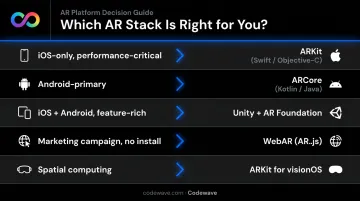
| Scenario | Recommended Stack |
|---|---|
| iOS-only, performance-critical | ARKit (native Swift/Objective-C) |
| Android-primary | ARCore (native Kotlin/Java) |
| iOS + Android, feature-rich | Unity + AR Foundation |
| Marketing campaign, no app install | WebAR (AR.js) |
| Spatial computing (Vision Pro) | ARKit for visionOS |
Cross-platform frameworks save cost but may sacrifice some native performance. For most enterprise applications, the trade-off favors cross-platform.
Step 4 — Build and Integrate 3D Assets
3D model quality, rigging complexity, and animation scope are the largest cost and time variables in most AR projects. Development teams need specialized 3D artists alongside software engineers.
Mobile performance optimization directly determines frame rate stability on target devices. Key techniques include polygon count management, texture compression, and level-of-detail systems.
Step 5 — Test Across Devices and Environments
AR apps must be tested in varied real-world conditions: different lighting, surface types, device models, and OS versions. Key QA benchmarks include:
- Object placement accuracy under varied lighting
- Frame rate stability (target 60fps on supported hardware)
- Tracking persistence during camera movement
- Performance across low-end and high-end device configurations
ARCore provides a built-in performance overlay showing real-time CPU and memory statistics during testing. Google also maintains a certified supported-devices list that should guide multi-device QA planning.
Codewave's QuantumAgile™ methodology supports this stage by simulating multiple development paths before final QA commitment, reducing the cost of late-stage course corrections.
Step 6 — Deploy, Monitor, and Iterate
Post-launch considerations include:
- App store AR permission requirements (camera access must be declared explicitly on both iOS and Android)
- Usage analytics: session length, AR feature activation rate, interaction depth
- A structured roadmap for iterative feature expansion based on real usage patterns — not speculation
How Much Does AR App Development Cost in 2026?
Cost is driven by four primary variables:
- 3D asset complexity — number of models, rigging, animation scope
- Feature set — surface detection, multiplayer, AI object recognition, backend integration
- Platform targets — iOS-only vs. cross-platform vs. headset support
- Development team — dedicated external partner vs. in-house build
Here's a realistic cost framework based on project type:
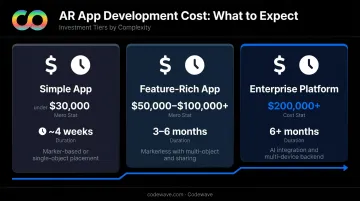
| Project Type | Estimated Cost | Typical Timeline |
|---|---|---|
| Simple marker-based or single-object placement app (ready assets) | Under $30,000 | ~4 weeks |
| Feature-rich markerless app (manipulation, sharing, multi-object) | $50,000–$100,000+ | 3–6 months |
| Enterprise AR platform (AI integration, multi-device, backend infrastructure) | $200,000+ | 6+ months |
For most organizations, the right approach is to launch an MVP with core AR functionality, validate with real users, then invest in advanced features. This limits upfront risk and builds the case for broader investment before you scale.
Codewave's ImpactIndex™ model is built around this principle: direct early investment toward the 20% of features that drive the majority of user outcomes, rather than shipping a full feature set before you know the core experience works.
Frequently Asked Questions
What is AR app development?
AR app development is the process of designing and building software that overlays digital content — 3D objects, text, animations, live data — onto a user's real-world environment, accessed through smartphones, tablets, or wearables. The app uses device cameras, sensors, and computer vision to anchor digital elements to the physical world in real time.
How much does it cost to develop an AR app?
Costs range from under $30,000 for a simple single-object AR app to $200,000+ for complex enterprise-grade platforms with AI integration and multi-device support. Key drivers include 3D asset complexity, feature scope, number of target platforms, and whether you build in-house or with an external partner.
Is AR still a thing?
Statista projects 1.19 billion mobile AR users globally by 2028, and AR glasses have hit mainstream adoption — Meta Ray-Ban smart glasses sold more than 900,000 units in Q4 2024 alone. Healthcare, retail, and manufacturing investment in AR continues to accelerate.
What industries benefit most from AR app development?
The industries with the highest documented AR ROI are:
- Healthcare: surgical guidance, medical training
- Retail: virtual try-ons, product visualization
- Education: interactive simulations, vocational training
- Manufacturing: assembly instructions, equipment diagnostics
How long does it take to build an AR app?
A simple AR app with ready 3D assets can be developed in four to six weeks. A full-featured markerless app with multi-object support, backend integration, and AI features typically takes three to six months, depending on feature complexity, asset production time, and QA scope.