Introduction
VR game development used to mean a AAA studio budget, proprietary hardware, and a team of dozens. That's no longer true. In 2026, a solo developer with a laptop, a Meta Quest 3S, and a free Unity license can build and publish a fully immersive VR experience from scratch.
The global VR market is valued at USD $15.9 billion and projected to reach $38 billion by 2029 — and the demand for developers who can build for it is growing across gaming, healthcare, education, and enterprise training.
That demand creates a real opening for anyone willing to learn. This guide is for complete beginners — aspiring developers, indie creators, and entrepreneurs — who want to understand what VR development actually involves in 2026: the skills required, the tools available, the platforms to target, and how to take your first real step.
Key Takeaways
- Free engines (Unity, Godot) and standardized APIs (OpenXR) have made VR development accessible to individuals and small teams
- C# + Unity + Meta Quest is the fastest beginner path to a working, deployable VR build
- Frame rate (72–90+ FPS) and motion sickness prevention are non-negotiable from day one
- VR has major applications in healthcare, retail, and enterprise training — not just gaming
- Start small: a single deployable scene teaches the full pipeline and scales to larger projects
What Is VR Game Development in 2026?
VR game development is the process of building interactive, real-time 3D experiences that fully immerse users in a virtual world through a head-mounted display (HMD). It sits within a broader category called XR (Extended Reality), which includes:
- AR (Augmented Reality) — overlays digital content onto the real world (think phone-based apps)
- MR (Mixed Reality) — blends real and virtual environments so digital objects interact with physical surfaces
- VR (Virtual Reality) — replaces the user's entire visual field with a virtual environment
How VR Development Differs from Traditional Game Development
Building for VR isn't just "3D game development with a headset." Several technical realities set it apart:
- Spatial interaction — users physically grab, throw, and manipulate objects rather than pressing buttons
- Head and hand tracking as primary inputs, replacing mouse and keyboard
- Frame rate and latency are safety concerns, not just quality metrics — drops cause real discomfort
- Full environmental immersion — every visual detail is within the user's field of view simultaneously
Those constraints also shape what VR is being used for — and it extends well beyond entertainment.
VR Beyond Gaming
The XR Association's 2025 State of the Industry report highlights accelerated enterprise adoption across healthcare, education, and workforce training. Specific examples already in production:
- Surgical training simulations in hospitals
- Safety procedure walkthroughs in manufacturing
- Virtual product showrooms in retail
- Immersive classrooms replacing static video-based learning
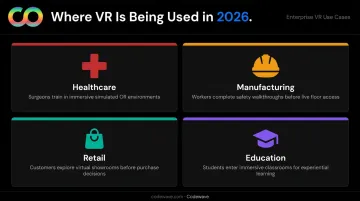
For beginners, that range of applications means the skills you build apply across industries hiring for spatial computing — not just game studios.
Core Technical Skills You Need to Get Started
Programming Languages for VR
C# is the top priority for beginners. It's Unity's native scripting language, readable, well-documented, and supported by a massive community of tutorials.
- C# — for Unity (most beginner-friendly engine, largest VR community)
- C++ — for Unreal Engine or lower-level performance work
- JavaScript — useful for WebXR prototyping, not a primary VR language
Start with C# and don't branch out until you've shipped something.
3D Mathematics and Spatial Thinking
Once you have a language, the next hurdle is spatial reasoning. VR requires working knowledge of:
- 3D coordinate systems: how position is defined in space
- Vectors: direction and magnitude of movement
- Quaternions: how rotations are represented (avoids "gimbal lock")
- Transforms: position, rotation, and scale combined for every object
Game engines handle most of this automatically, but understanding the basics prevents confusing bugs. A beginner-friendly linear algebra course focused on game development will cover what you need.
3D Modeling and Asset Fundamentals
You don't need to become a 3D artist, but the fundamentals matter. Polygons and meshes form the structure of every 3D object. UV mapping controls how 2D textures wrap around those surfaces. Level of Detail (LOD) swaps in lower-polygon versions of objects at a distance to preserve performance.
Blender (free, open-source) is the standard tool for creating and optimizing VR-ready assets. Keeping polygon counts and texture sizes low is critical on standalone headsets like Meta Quest.
Spatial UX and Interaction Design
VR has its own design language. UI panels float in 3D space, interactions must feel physically intuitive, and navigation that disorients users will cost you retention fast.
Key spatial UX principles to internalize early:
- Comfortable viewing angles for text and UI (avoid placing elements too close or at extreme angles)
- Intuitive locomotion — teleportation vs. smooth movement, and when to offer each
- No occlusion of critical UI elements by the player's own hands or objects
- Interactions that match real-world expectations (a door handle should pull, not push)
Performance Optimization Fundamentals
Spatial UX sets the experience — performance keeps it comfortable. Meta Quest requires a minimum of 72 FPS, with Quest 3 and 3S supporting 90 Hz and 120 Hz display modes. Drop below that threshold and users feel it immediately as discomfort or nausea.
Beginner-level concepts to learn early:
- Draw call reduction: minimize rendering commands issued per frame
- Occlusion culling: skip rendering geometry the user can't currently see
- Texture compression: reduce file size without meaningful visual quality loss
- CPU vs. GPU bottlenecks: identify which side of the system is actually throttling performance
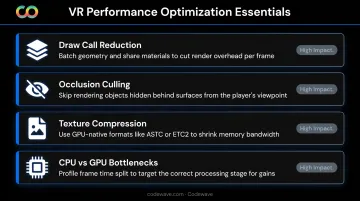
Standalone headsets (Meta Quest) are more hardware-constrained than PCVR, making optimization a first-class concern from day one.
Choosing the Right Game Engine and Development Tools
Unity: The Beginner's Default
Unity is the right starting point for most beginners. Here's why it leads the pack:
- Largest community of VR developers (~850,000 XR developers estimated)
- Official VR templates pre-configured with XR Origin, controllers, and locomotion
- XR Interaction Toolkit (XRI) — built-in package handling grabbing, locomotion, and UI out of the box
- Strong Meta Quest support via the OpenXR plugin
- Free tier available for indie and beginner developers
- C# scripting with extensive beginner tutorial coverage
The XRI package alone saves weeks of foundational work. Rather than coding a grab interaction from scratch, you configure components — then customize from there.
Unreal Engine: For High-Fidelity Visuals
Unreal is the choice when high-fidelity, visually detailed environments are the priority. Blueprint visual scripting lets beginners build logic without writing C++ directly, which lowers the barrier to entry for non-programmers. That said, Unreal's steeper learning curve and higher resource requirements make it better suited for developers who already have some experience or have a specific visual quality target in mind.
Godot: The Open-Source Alternative
Godot is fully open-source (MIT license), lightweight, and has growing VR support through OpenXR. Its scripting language, GDScript, reads similarly to Python. It's a strong choice for developers who want to avoid vendor dependency or are building PCVR experiences on a tight budget.
Supporting Tools Every VR Developer Needs
| Tool | Purpose |
|---|---|
| Blender | 3D modeling, animation, and asset optimization |
| Git/GitHub | Version control and project management |
| Meta XR SDK / OpenXR plugin | Headset integration and platform targeting |
| Unity Profiler / Unreal Insights | Performance testing and bottleneck identification |
| WebXR (Babylon.js, A-Frame) | Rapid cross-platform prototyping in the browser |
Selecting Your Target VR Platform
Comparing the Main Platforms in 2026
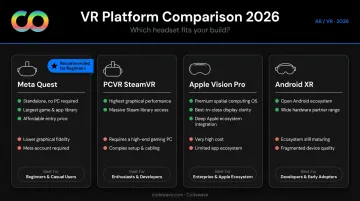
| Platform | Pros | Cons | Best For |
|---|---|---|---|
| Meta Quest | Standalone, largest ecosystem, $2B+ in content sales | Hardware constraints vs. PCVR | Beginners — recommended starting point |
| PCVR (SteamVR/OpenXR) | Highest performance ceiling | Requires powerful PC, tethered setup | Developers targeting visual fidelity |
| Apple Vision Pro / visionOS | Premium hardware, growing market | Requires Apple Silicon Mac, smaller install base | Developers targeting Apple ecosystem |
| Android XR | OpenXR-supported, emerging platform | Early ecosystem, fewer users | Forward-looking projects |
Recommendation: Start with Meta Quest + Unity. It's the fastest path to a working, testable build — no external hardware required.
Why OpenXR Matters
OpenXR is the industry-standard API in 2026 that lets a single codebase target multiple platforms without vendor lock-in. Meta Quest uses it natively, SteamVR and Android XR are both built on it, and new platforms continue to adopt it. Starting with OpenXR means your project stays portable as the hardware landscape evolves. That portability also shapes what you need on the hardware side.
Hardware Setup for Development
Any modern PC or Mac with a discrete GPU runs Unity or Unreal well enough for VR development. A Meta Quest headset doubles as a standalone device and a PCVR headset via Link cable or Air Link — useful for testing both deployment targets from a single device.
Minimum recommended setup:
- GPU: NVIDIA RTX 3060 or AMD equivalent
- RAM: 16 GB
- OS: Windows 10/11 or macOS (for visionOS development)
- Meta Quest 3 or 3S (best value for beginners in 2026)
Essential Best Practices for VR Beginners
Prioritize User Comfort and Prevent Motion Sickness
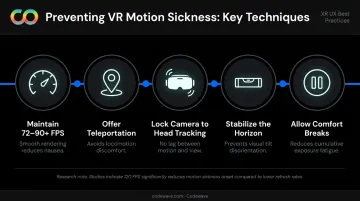
VR sickness occurs when visual motion doesn't match physical sensation. It's the most common reason users abandon VR experiences entirely. Address it from the start — it shapes every core design decision.
Key mitigation techniques:
- Maintain 72–90+ FPS at all times — frame drops are felt immediately
- Offer teleportation as an alternative to smooth locomotion
- Never move the camera independently of head tracking
- Keep the horizon stable — tilting or rolling the world causes rapid disorientation
- Allow users to take breaks and adjust comfort settings
Peer-reviewed research confirms that 120 FPS significantly reduces simulator sickness compared to lower frame rates — higher is always better where hardware allows.
Build Iteratively and Test on Device Early
A scene that looks fine on a monitor can feel cramped, disorienting, or nauseating the moment you put on a headset. Build small testable loops:
- Create a basic scene in Unity
- Deploy to the headset (takes minutes with a Quest connected)
- Experience it in VR — note what feels wrong
- Iterate before adding new features
Unity's XR Device Simulator allows basic in-editor testing without a headset, but device testing is irreplaceable for accurate comfort evaluation.
Design for Spatial Interaction
Spatial interaction is what separates VR from a flat-screen experience — and it only works when interactions feel physically grounded. Unity's XRI provides an Interactor/Interactable component system that handles grabbing, throwing, and socket interactions without building from scratch.
Two things beginners consistently underestimate:
- Haptic feedback (controller vibration) dramatically increases the sense of physical presence — implement it early
- Object weight and resistance — interactions that feel weightless break immersion even when visually correct
Start Small: Your First VR Project
Resist the urge to build a full game first. A minimal, completable project — a single room-scale scene with grabbable objects, a basic floating UI, and one core mechanic — teaches the full pipeline:
- Scene setup and spatial layout
- Scripting interactions
- Building and deploying to a headset
- Testing and iterating based on real headset feel
Use Unity's official VR Template as your starting point. It comes pre-configured with XR Origin, controller inputs, and locomotion, so you can skip the initial configuration and start building right away.
How to Start Your VR Game Development Journey Today
A Practical 3-Step Starter Path
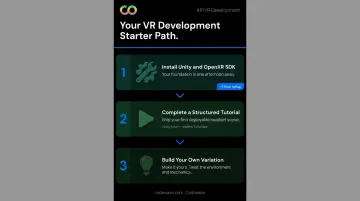
- Install Unity (free) and set up the OpenXR plugin or Meta XR SDK following Meta's official developer documentation. This takes roughly an hour.
- Complete one structured beginner tutorial that ends with a deployable scene on a headset. Unity's official VR Development Learning Pathway and the community resource Valem Tutorials (which supports a community of 45,000+ XR developers) are both solid starting points.
- Build your own variation — change the environment, add one new mechanic, modify the locomotion system. Ownership of concepts comes from making something yours, not just following steps.
Building a Portfolio and Finding Community
Even a simple demo signals competence to employers or clients. To build visibility:
- Share projects on SideQuest (the primary indie distribution platform for Meta Quest)
- Publish source code and build notes on GitHub
- Engage with communities on Reddit's r/virtualreality, Unity Forums, and Meta's developer forums
- Document your build process — a short writeup on what you built and what you learned is more useful than a polished video trailer
When to Work With a Development Partner
For businesses and entrepreneurs exploring VR as a product, whether a training simulation, enterprise application, or immersive customer experience, building development capability from scratch isn't always the right path. When time-to-market matters more than learning the engine, working with a specialized partner makes sense.
Codewave develops custom VR and spatial computing applications for clients in healthcare, education, retail, and enterprise — using Unity 3D, Unreal Engine, WebXR, and A-Frame depending on the use case. Their ImpactIndex™ model ties engagements to measurable outcomes, which suits teams that need to ship a product without building an in-house development team first.
Frequently Asked Questions
Is VR development a growing field?
Yes. The VR market is projected to reach $38 billion by 2029, with the XR Association's 2025 report confirming accelerated enterprise adoption. Reality Atlas reported approximately 12,500 XR job postings on LinkedIn in January 2026 alone, signaling strong and expanding developer demand.
What programming languages do I need for VR game development?
Start with C# for Unity-based development — it's the most beginner-friendly path. C++ becomes relevant if you move to Unreal Engine. JavaScript is useful for WebXR prototyping but isn't a primary VR language.
Do I need a VR headset to start developing VR games?
Not to write code, but yes to develop properly. Unity's XR Device Simulator covers basic in-editor testing, though a Meta Quest headset is strongly recommended for accurate comfort evaluation and real iteration. It offers the lowest entry cost with the broadest developer ecosystem.
How long does it take to build a first VR game as a beginner?
A simple deployable scene with basic interactions can be built in a weekend using Unity's VR Template. A polished small-scale VR game typically takes 1–3 months for a dedicated beginner, depending on scope and prior programming experience.
What is the difference between VR, AR, and MR?
VR replaces your entire field of view with a virtual environment. AR overlays digital content onto the real world (you still see reality). MR blends both so digital objects interact with real surfaces. All three fall under XR, and OpenXR supports development across all three categories.
Can I develop VR games without a computer science degree?
Many successful VR developers are self-taught. Free engines, official documentation, community tutorials, and platforms like Unity Learn provide everything needed to build real skills. Unity certifications and structured online courses are widely accepted alternatives to formal degrees.