Yet ask five vendors what an AR app costs, and you'll get five very different answers — because they're right to disagree.
AR app development costs range from under $15,000 for a basic marker-based prototype to over $300,000 for an enterprise-grade spatial computing platform. The gap isn't arbitrary. It reflects real differences in 3D content volume, AI complexity, platform scope, and team composition. This article breaks down exactly where the money goes — and where you can avoid wasting it.
Key Takeaways
- AR app costs range from $10,000 to $300,000+ depending on complexity, platform, and 3D content volume
- Custom 3D asset creation, AI integration, and cross-platform development are the biggest cost drivers
- Startups validating an MVP should expect $10,000–$50,000 for marker-based, single-platform AR
- Enterprise builds (spatial computing, multi-user, IoT) typically run $150,000–$300,000+
- Post-launch maintenance adds 15–25% of initial build cost annually, so budget for it before the first line of code is written
How Much Does AR App Development Cost in 2026?
AR development doesn't have a fixed price. Costs are shaped by complexity, platform, features, team location, and ongoing needs. Two companies can describe "an AR app" and need builds that differ by $200,000 — because one means a QR-triggered product overlay and the other means real-time multi-user spatial collaboration.
Two budgeting mistakes show up repeatedly:
- Treating AR like a standard mobile app — and forgetting that 3D asset creation can cost as much as the code itself
- Ignoring recurring costs — SDK licensing, OS compatibility updates, and cloud hosting for 3D assets aren't optional line items after launch
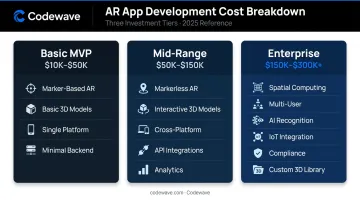
The three build tiers below reflect where most projects actually land.
Basic AR App (MVP / Proof-of-Concept)
Typical cost range: $10,000 – $50,000
What's included:
- Marker-based or simple markerless AR
- Basic 3D models (low-poly or pre-built assets)
- Single platform — iOS or Android
- Minimal backend, user authentication, small content catalog
This tier suits startups validating an AR concept, retail brands running a limited product visualization campaign, or education platforms testing AR-enhanced content before committing to a larger build.
Mid-Range AR App (Custom / Multi-Feature)
Typical cost range: $50,000 – $150,000
What's included:
- Markerless or geolocation-based AR
- Interactive 3D models with animation
- Cross-platform support (iOS + Android)
- Third-party API integrations — CRM, payment, social sharing
- Moderate backend infrastructure and analytics
Best for: Retail and e-commerce apps offering virtual try-on, healthcare or industrial training simulations, or navigation apps with location-triggered AR content — anywhere the experience needs to feel polished but the scope stays defined.
Advanced / Enterprise AR App
Typical cost range: $150,000 – $300,000+
What's included:
- Full spatial computing capabilities
- Real-time multi-user interactions
- AI-powered object recognition and personalization
- IoT integration and cloud infrastructure
- Compliance requirements (HIPAA for healthcare, enterprise security standards)
- Extensive custom 3D content library
Best for: Healthcare providers building surgical training tools, manufacturers deploying AR-guided assembly instructions, or enterprises running immersive customer experiences across distributed teams and locations.
Key Factors That Affect AR App Development Cost
The final cost of an AR app comes from a combination of technical, creative, and operational factors. Understanding each one prevents budget surprises mid-project.
Type of AR Technology Used
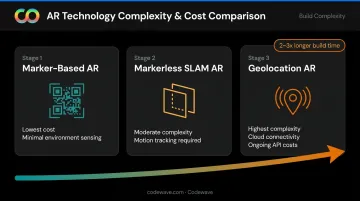
The AR approach you choose sets the floor for complexity — and cost:
- Marker-based AR — detects a 2D image (product packaging, a poster) and overlays content on it. ARCore can track up to 20 images simultaneously with up to 1,000 reference images per database. Cheapest to build, minimal environment sensing required.
- Markerless / SLAM AR — uses motion tracking and plane detection so virtual content appears to rest on real-world surfaces without a physical trigger. Moderate complexity; requires more device computation and testing.
- Geolocation-based AR — attaches content to physical coordinates using tools like the ARCore Geospatial API, which enables global-scale experiences tied to Google Street View coverage. Most complex, requires cloud connectivity and ongoing API costs.
Each tier adds development hours and testing surface area. A geolocation AR experience typically takes 2–3x longer to build and stabilize than an equivalent marker-based implementation.
App Complexity and Feature Set
Features compound cost quickly. According to Clutch, simple AR projects require 638–996 development hours; complex AR apps require 1,590–1,960 hours — roughly double.
Features that add the most hours:
- Real-time 3D object recognition and AI-powered overlays
- Multi-user collaboration with synchronized AR state
- IoT device integration (sensor data feeding into AR overlays)
- Animated 3D models vs. static overlays (animation adds rigging, physics, and optimization work)
- Edge AI processing for low-latency, on-device inference
AI-powered object recognition, gesture control, and spatial computing features consistently sit at the top of the hours-per-feature scale — expect these to anchor your most complex (and costly) scope decisions.
Platform Choice
| Platform | Cost Implication |
|---|---|
| iOS only (ARKit) | Lower cost, narrower reach |
| Android only (ARCore) | Lower cost, broader device range |
| Both natively | Higher cost — dual codebase |
| Cross-platform (Unity, WebXR) | 20–40% cost reduction vs. native dual-platform |
Cross-platform development broadens reach but introduces its own complexity. Unity's licensing structure (Personal tier free under $200,000 revenue, Pro/Enterprise by subscription) and SDK selection both affect project economics. ARKit requires iOS 11+ and an A9 chip minimum; ARCore eligibility varies by device and must be validated against Google's supported device list.
Volume and Quality of 3D Content
3D content creation is the most frequently underestimated cost in AR development. A custom, photorealistic 3D model with textures can take 80+ hours for a single asset. Scale that across a retail product catalog with hundreds of SKUs and the cost becomes a dominant line item.
Rough benchmarks (from independent market data):
- Simple 3D model: $100 – $500
- Complex, photorealistic model: $1,000 – $5,000+
- Freelance 3D modeling rates: $20 – $100/hour
Pre-built assets from marketplaces like TurboSquid (royalty-free after purchase, no ongoing royalties required) can significantly reduce costs for projects where fidelity requirements are flexible.
Development Team Location and Composition
Where your team is located has an outsized impact on total cost. AR-specific developer rates by region:
| Region | Hourly Rate (AR Developers) |
|---|---|
| North America | ~$150/hour |
| United Kingdom | ~$70/hour |
| Eastern Europe | ~$35/hour |
| India | ~$30/hour |
Team composition matters just as much. A full AR project typically requires:
- AR/XR developer — core build and SDK integration
- 3D modeler — asset creation and optimization
- UX designer — spatial interaction design (more complex than standard mobile UX)
- QA engineer — device coverage and edge-case testing
- Project manager — scope, timeline, and stakeholder coordination
Each role adds to total build cost. Cutting QA or UX early tends to generate expensive rework in later phases.
AR App Development Cost Breakdown
The sticker price of AR development rarely reflects the full investment. Here's where the budget actually goes.
One-Time Costs
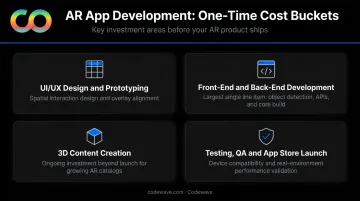
Four cost buckets drive most of the upfront spend:
- UI/UX Design and Prototyping — AR UX requires spatial interaction design, real-world overlay alignment, and lighting validation. Expect more prototype iterations than a standard mobile app.
- Front-End and Back-End Development — The largest single line item. Front-end covers object detection, tracking, and rendering; back-end handles APIs, user management, cloud storage for 3D assets, and analytics pipelines.
- 3D Content Creation and Asset Management — Budgeted as a launch cost, but treat it as recurring. A growing retail product catalog means ongoing 3D modeling as new SKUs are added.
- Testing, QA, and App Store Launch — Device compatibility testing spans a wide hardware range, since cameras, sensors, and processing power vary significantly. Performance testing across real environments (different lighting, surfaces, distances) adds time beyond standard mobile QA.
Recurring Annual Costs
One-time build costs tell only part of the story. Once launched, AR apps carry ongoing costs that most project budgets underestimate.
Maintenance, Updates, and Licensing
According to Business of Apps, annual mobile app maintenance runs 15–25% of the original development cost. For AR apps, that range runs higher in practice: AR SDKs update with every major iOS and Android release, and compatibility breaks are common. ARCore's What's New page shows active SDK updates as recently as April 2026.
Recurring cost components include:
- SDK licensing fees (Vuforia commercial plans, Apple Developer Program at $99/year)
- OS compatibility updates triggered by ARKit/ARCore SDK changes
- Cloud hosting for 3D assets (AWS S3 or Google Cloud CDN)
- New 3D content as catalogs expand
How to Estimate the Right Budget for Your AR App
The right AR budget isn't about spending more — it's about spending in the right order.
Four Questions to Answer Before Talking to a Vendor
- What business outcome must this AR app drive? Engagement, sales conversion, training efficiency, or error reduction? The answer determines which features are essential vs. optional.
- How many users will use it, and at what concurrency? A 50-user internal training tool has very different infrastructure requirements than a consumer-facing retail AR app with 100,000 simultaneous sessions.
- Does the app require custom 3D assets, or can existing assets be reused or licensed? This single decision can shift the budget by $50,000 or more.
- Which platform must be supported at launch vs. which can come later? Deferring Android or iOS to v2 reduces initial cost significantly.
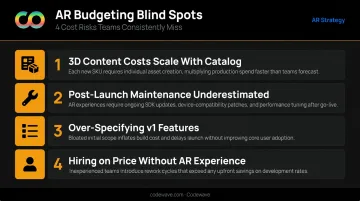
Four Budgeting Blind Spots to Avoid
- 3D content costs grow with your product catalog — budget for ongoing asset creation, not a one-time line item
- Post-launch maintenance is consistently underestimated; OS updates routinely break AR SDK integrations
- Over-specifying v1 features slows delivery; users rarely need everything on day one
- Hiring on price alone without validating AR-specific experience leads to costly rework from developers without spatial computing depth
That last point is where projects most often go sideways. Codewave's QuantumAgile™ approach addresses it directly — validating AR concepts through rapid prototyping and simulated outcomes before committing to full-scale development. UX problems and technical constraints surface at prototype cost, not after a full build.
Frequently Asked Questions
How much does it cost to make an augmented reality app?
AR apps cost between $10,000 and $300,000+, depending on AR type (marker-based vs. spatial computing), platform scope, 3D content volume, and team location. Most mid-range custom AR apps for commercial use fall in the $50,000–$150,000 range.
How long does it take to build an AR app?
Build timelines vary by complexity:
- Basic AR MVP: 4–6 months
- Mid-range custom app: 6–9 months
- Advanced enterprise AR (spatial computing, multi-user, compliance): 9–18 months or more
What type of AR app is the cheapest to develop?
Marker-based AR is the least expensive because it relies on a visual trigger and requires minimal environment sensing. It's well-suited for marketing campaigns and product showcases with tighter budgets.
What are the hidden ongoing costs of an AR app after launch?
The main recurring costs are SDK licensing, OS compatibility updates (ARKit and ARCore both change with each iOS/Android release), cloud hosting for 3D assets, and new 3D model creation as your product catalog grows. Budget 15–25% of initial build cost annually.
Is it better to build an AR MVP first or invest in a full-scale build?
An MVP-first approach makes sense for most businesses. It validates core AR functionality with real users for a fraction of the full build cost, and surfaces UX problems before they become expensive architectural fixes.
Which industries get the most ROI from AR app development?
Several industries have documented, measurable returns from AR:
- Retail: Virtual try-on increases conversion rates
- Healthcare: AR surgical training shows consistent error reduction in peer-reviewed studies
- Education: AR tools improve spatial understanding and academic performance
- Manufacturing: AR work instructions reduce assembly errors