Manual counting, periodic audits, and barcode scanning have historically been the answer. But they're slow, labor-intensive, and always working from yesterday's data.
Computer vision changes the equation. AI-powered cameras and image recognition now let businesses monitor stock continuously — without human intervention, at a scale that traditional methods simply can't match. Instead of discovering a stockout during a weekly audit, you're alerted the moment a shelf empties.
This article covers what computer vision actually does in inventory contexts, where it's being deployed today, what measurable outcomes it delivers, how to implement it properly, and what challenges to plan for.
Key Takeaways
- Computer vision uses AI-powered cameras to continuously monitor inventory levels, product movement, and anomalies without manual scanning
- It delivers hands-free visibility across warehouses, retail shelves, and distribution centers at the same time
- Real-world outcomes include reduced stockouts, faster replenishment, lower shrinkage, and fewer hours on manual counts
- Successful deployment depends on clean product data, reliable camera infrastructure, and integration with existing inventory systems
- CV is not plug-and-play; it requires phased rollout, model training, and ongoing maintenance to perform reliably
What Is Computer Vision in Inventory Management?
Computer vision (CV) is an AI discipline that enables machines to interpret visual data from cameras and sensors, then act on what they observe. In inventory contexts, that means identifying products, counting stock, reading labels, and detecting movement — all without human involvement.
How It Differs from Barcodes and RFID
The distinction matters practically:
- Barcode scanning requires a worker to manually scan each item one at a time
- RFID needs embedded tags and reader infrastructure, with line-of-sight or proximity constraints
- Computer vision monitors inventory passively through cameras — continuously, simultaneously, without touching individual items
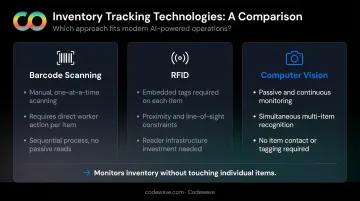
CV works alongside barcodes and RFID rather than replacing them — filling the gaps those methods leave when items move, shift, or go unscanned. That passive, continuous coverage is what the underlying technology makes possible.
The Core Technology Stack
Three components work together to make CV inventory systems function:
- High-resolution cameras capturing continuous visual data across shelves, docks, or storage areas
- Machine learning models trained on product images to identify, classify, and count objects — even when partially obscured or repositioned
- Software integrations that translate visual detections into actionable inventory records, reorder triggers, and exception alerts
Model training is where implementation complexity concentrates: the breadth of product images used, the variety of lighting and shelf conditions covered, and the rigor of validation directly determine how accurately the system performs in production.
Key Applications of Computer Vision Across Inventory Environments
CV is already operational across retail, warehousing, manufacturing, and healthcare. In high-volume environments where inventory errors translate directly into lost revenue, these deployments are production systems — not pilots.
Retail Shelf Monitoring and Stockout Detection
Retailers place cameras facing shelves to continuously detect empty spaces, low-stock products, and planogram compliance violations. Staff receive real-time alerts to replenish before customers notice the gap.
A concrete example: BJ's Wholesale Club deployed Simbe's Tally computer vision system across its club environment. The results — 60% fewer out-of-stocks, 90% fewer pricing and promotion errors, and 50% shorter e-commerce fulfillment times — illustrate what shelf-level visibility delivers at scale. These are vendor-reported figures, so independent validation matters — but the directional impact aligns with what shelf-level CV systems consistently target.

That same visual data also surfaces purchasing velocity and demand patterns at the shelf level — directly informing replenishment timing and product placement.
Warehouse Inventory Tracking and Location Verification
CV systems placed at receiving docks, storage aisles, and pick zones track inventory as it flows through a facility — automatically updating stock location records without requiring workers to scan every item manually.
Picking accuracy is a direct beneficiary. CV can verify that items are stored in correct bin locations and flag misplacements before they cause fulfillment errors later in the process. Zebra's work with Rebl warehouse robots — using a 2D/3D perception stack — achieved greater than 99.7% picking accuracy. That result reflects a specific deployment; your SKU mix, facility layout, and throughput volume will shape what's achievable in practice.
Manufacturing and Quality-Integrated Inventory Control
In manufacturing, CV simultaneously serves inventory and quality control functions: tracking raw materials and work-in-progress (WIP) through production stages while detecting defective units before they enter finished goods inventory.
The baseline problem here is significant. A 2024 Zebra study found that only 16% of manufacturing leaders had real-time visibility into WIP across their entire production process — meaning most manufacturers are operating with major blind spots between input and output.
Loss Prevention and Anomaly Detection
CV monitors for inventory anomalies — unauthorized product movement, receiving discrepancies, shrinkage events — and generates exception alerts in near real-time. Teams can investigate issues as they happen rather than discovering them weeks later during an audit.
The Business Case: Measurable Benefits of Computer Vision
Features don't justify investment — outcomes do. Here's where the business case for CV actually holds.
Inventory Accuracy and Real-Time Visibility
CV's continuous monitoring closes the lag between physical inventory movement and system record updates. That lag is the root cause of the 60%+ record inaccuracy rate cited earlier. When cameras detect stock movement and immediately update records, inventory positions stay current rather than drifting further from reality between count cycles.
Reduced Labor Costs for Manual Counting
Manual cycle counts, physical audits, and periodic inventory checks consume significant staff time — time that CV's monitoring layer can reclaim. Workers shift from routine counting to exception handling and higher-value tasks. The exact labor savings vary by facility size and current process maturity, but the structural shift is consistent: fewer people counting, more people acting on what the system flags.
Faster Replenishment and Fewer Stockouts
Real-time low-stock detection compresses the replenishment cycle. Instead of a stockout being discovered during a scheduled walk, the alert fires the moment inventory drops below threshold. That compression — from detection to reorder trigger — reduces lost sales and prevents the overcompensation that leads to excess inventory on the next order.
Shrinkage Reduction
NRF measured U.S. retail shrink at $112.1 billion in FY2022, equal to 1.6% of sales across 177 retail brands. CV's continuous monitoring creates both a deterrent effect and faster incident response. Cameras flag unauthorized product movement and receiving discrepancies in real time, making losses harder to conceal and faster to investigate.
Scalable Multi-Location Visibility
CV systems can monitor hundreds of SKUs across multiple facilities simultaneously from a centralized dashboard — something manual processes cannot scale to match. For businesses managing inventory across distribution networks, that unified visibility enables central teams to:
- Spot regional imbalances before they become stockouts or overstock situations
- Trigger location-specific replenishment without waiting for site-level reports
- Compare inventory accuracy across facilities and prioritize where intervention is needed
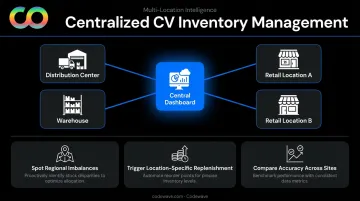
Codewave builds custom AI-powered inventory intelligence that connects CV outputs to ERP systems, automated reorder workflows, and centralized dashboards — giving operations teams a single view across every location they manage.
How to Implement Computer Vision for Inventory Management
CV implementation works best as a phased process. The businesses that get the most from it start narrow, prove value, then expand with intention. Trying to automate everything at once is a reliable path to an expensive, underperforming system.
Step 1: Establish Your Data and Product Identification Foundation
CV depends on reliable product data. Standardized SKUs, clean barcode records, and consistent labeling must exist before cameras go up. If your inventory data is inaccurate or labeling is inconsistent, CV amplifies those problems — it doesn't fix them.
Step 2: Define the Use Case and Success Metrics
Pick one specific inventory problem to solve first:
- Stockout detection on a specific shelf zone
- Receiving accuracy at a dock
- Shrinkage monitoring in a high-risk area
Then establish clear KPIs: inventory accuracy rate, stockout frequency, replenishment response time, labor hours saved per week. Without defined targets, there's no way to know whether the system is working or where it's falling short.
Step 3: Select and Deploy Camera Infrastructure
Key hardware decisions:
- Resolution requirements based on product size and label detail
- Placement strategy — viewing angles, coverage area, lighting conditions
- Edge vs. cloud processing — edge processing delivers faster local response; cloud processing scales more easily for remote analysis
Poor camera placement is one of the most common reasons CV systems underperform. Lighting deserves particular attention — inadequate or inconsistent lighting is widely cited as the leading cause of machine vision failures, and getting it wrong affects every detection downstream.
Step 4: Train the Model and Integrate with Inventory Systems
CV models must be trained on images from the actual operating environment — different lighting conditions, product orientations, packaging variants, and partially obscured items. A model trained on clean studio images will struggle in a real warehouse.
The system only becomes operationally valuable when it connects to inventory management software via API — automatically updating records, triggering reorder workflows, and generating exception alerts. Codewave handles these integrations end-to-end, connecting CV outputs directly to existing ERP or inventory platforms so detections translate into action, not just data.
Step 5: Pilot, Measure, and Expand
Run a controlled pilot in one area. Measure against defined KPIs. Correct model errors. Validate real-world performance before scaling. Then plan for ongoing maintenance — models need retraining as products change, shelf layouts shift, and new SKUs are introduced.
Challenges and Limitations to Plan For
CV is powerful, but real-world inventory environments are messy. Businesses that treat it as set-and-forget will be disappointed.
The "Messiness" Problem: Occlusion, Lighting, and Packaging Changes
The core technical challenges that degrade CV accuracy:
- Occlusion — products stacked or partially hidden behind other items
- Inconsistent lighting — shadows, glare, and variation across facility zones
- Similar-looking SKUs — products with nearly identical packaging that confuse models
- Packaging redesigns — label changes that require model retraining to maintain accuracy
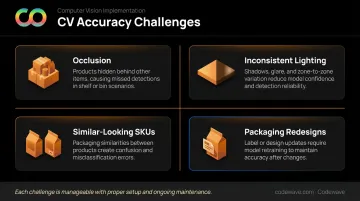
These are manageable with proper setup, but they must be factored into both initial design budgets and ongoing maintenance costs. They don't go away after launch.
Integration Complexity and Initial Investment
Upfront costs typically span several categories:
- Hardware: cameras and edge computing devices
- Software licensing and model development
- Systems integration and staff training
For smaller operations, tightening barcode processes and cycle count discipline may deliver better ROI per dollar than a full CV deployment. CV makes the most economic sense at scale: higher inventory volumes, more SKUs, larger facilities, or multi-location networks where manual processes consistently break down.
The Human Oversight Imperative
CV works best as a monitoring and alerting layer, not a replacement for human judgment. Exception alerts still require investigation. Model outputs should be validated, particularly in early deployment phases.
Walmart's decision to end its Bossa Nova shelf-scanning robot program — after testing in approximately 500 stores — offers a useful lesson. Reuters reported that Walmart found employees could obtain similar results through their own processes. The takeaway isn't that CV fails; it's that automation must outperform the complete human workflow, including exception handling, to justify the investment.
That lesson points toward a practical principle: start with well-scoped deployments where CV has a clear advantage over existing workflows. As edge computing, AI robotics, and IoT integration mature, CV systems will become faster, more accurate, and more self-correcting. That's a reason to build on solid foundations now, not a reason to wait for perfect technology.
Frequently Asked Questions
What is computer vision in inventory management?
Computer vision uses AI-powered cameras and image recognition to automatically monitor inventory levels, track product movements, and detect anomalies in real time. Unlike manual scanning or periodic counts, it works continuously — interpreting visual data without human intervention.
How does computer vision differ from barcode scanning and RFID?
Barcodes require manual one-by-one scanning; RFID needs embedded tags and proximity readers. Computer vision monitors inventory passively through cameras — continuously and without direct product interaction. In practice, CV is often deployed alongside barcodes or RFID rather than replacing them outright.
Which industries benefit most from computer vision inventory management?
Retail (shelf monitoring and stockout detection), warehousing and logistics (movement tracking and pick accuracy), manufacturing (raw material and WIP visibility), and healthcare (medical supply management) see the highest impact. All share high inventory volumes and accuracy requirements where errors carry real cost.
What are the biggest challenges of implementing computer vision for inventory?
The three most common: poor lighting and product occlusion degrading recognition accuracy, high upfront hardware and integration costs, and ongoing model retraining as products and layouts change. Each is manageable with the right scoping and phased rollout approach.
How much does it cost to implement computer vision for inventory management?
Costs vary widely based on facility size, camera count, edge vs. cloud processing, and integration complexity — no single benchmark applies universally. Starting with a scoped pilot in one area is the most reliable way to validate ROI before committing to full deployment.
What is the future of computer vision in supply chain and inventory management?
Advances in edge computing, AI robotics, and IoT integration are making CV systems faster and more accessible. Autonomous inventory robots and tightly integrated multi-system data pipelines are already moving from pilot to production — with the retail CV market projected to grow from $1.66 billion in 2024 to $12.56 billion by 2033, according to Grand View Research.