Introduction
Payroll has emerged as one of the most repetitive, high-stakes back-office functions in any organization—yet it continues to struggle with accuracy. The average company achieves only an 80% payroll accuracy rate and makes 15 corrections per pay period, costing $281 per incident on average. For HR and finance teams across industries, Robotic Process Automation (RPA) offers a path to replace these error-prone manual workflows with automated precision.
But many organizations exploring RPA for payroll encounter practical friction: processes remain poorly documented, systems operate in silos, and teams aren't certain where automation ends and human judgment begins. The result? Up to 50% of initial RPA projects fail, often due to brittle scripts, inflated expectations, and insufficient process preparation.
This guide covers how to implement RPA in payroll correctly—when to use it, what to prepare, how to deploy it step-by-step, and how to sustain it over time.
Key Takeaways
- RPA delivers the strongest ROI for rule-based, high-volume payroll tasks—data entry, tax calculations, reconciliation, and payslip generation
- Prerequisites: documented process maps, structured data, compatible systems, and a clear governance framework
- Implementation follows a fixed sequence: discovery, configuration, parallel testing, go-live, then continuous monitoring
- Most failures stem from skipping documentation or automating undocumented exceptions
- Maximum value requires applying RPA across interconnected sub-processes, not isolated tasks
When Should You Use RPA for Payroll?
RPA works best when applied to payroll processes that meet specific conditions. Not every payroll pain point qualifies for automation—success depends on the nature of the work itself.
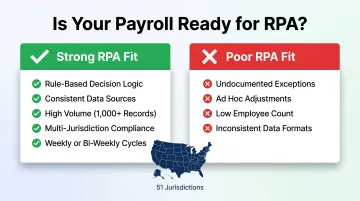
Ideal Conditions for Payroll RPA:
- Follows clear "if/then" decision trees without requiring subjective interpretation
- Uses consistent data sources with predictable inputs and outputs
- Executes steps in the same order every time, with documented exceptions
- Processes hundreds or thousands of pay records per cycle, where automation returns real efficiency gains
Organizations running payroll for large headcount on weekly or bi-weekly cycles see the strongest returns. Multi-entity operations—where payroll spans multiple jurisdictions with varying compliance requirements—gain even more value. The United States now ranks 6th globally in payroll complexity, with complexity increasing 17% since 2023 due to 51 distinct state and jurisdictional frameworks.
Where RPA Often Fails:
Applying bots to undocumented processes is the most common error. If your payroll team can't map every keystroke and decision point, bots can't be configured accurately.
Exception-heavy workflows—ad hoc bonuses, disputed pay queries, retroactive adjustments—require human discretion and make poor automation candidates. Only 19-20% of organizations achieve 80% or more process standardization, so most companies need to standardize processes before RPA delivers meaningful returns.
Scale and Frequency Matter:
RPA economics improve with scale. Processing 50 employees monthly offers limited ROI; processing 5,000 employees bi-weekly justifies the investment. Over 36% of organizations now manage payroll in 6+ countries, and 48% lack a single global payroll system—creating fragmented workflows where RPA connects those fragments faster and at lower cost than replacing the underlying platforms.
What You Need Before Deploying RPA in Payroll
Successful payroll RPA depends on four foundational prerequisites. Skipping any of them significantly raises your risk of deployment failures, compliance gaps, or costly rework.
1. Documented Process Maps
RPA bots execute logic exactly as configured — they don't improvise. If your payroll process isn't documented to the keystroke and decision level, bots can't be accurately built, and undocumented steps surface as errors post-deployment.
Poor quality of data inputs, late time-tracking data, and inputs after payroll cut-off are the top three root causes of decreased payroll accuracy — all preventable through rigorous process documentation.
2. Clean, Structured Data Inputs
RPA requires consistent data formats from HRIS, time-tracking, and benefits systems. The following all cause bot failures or incorrect outputs:
- Manual spreadsheets with variable structures
- Inconsistent date formats across source systems
- Mixed naming conventions between HRIS and payroll platforms
Resolve data quality issues before deployment, not after. Retrofitting bots around bad data is far more expensive than cleaning inputs upfront.
3. Compatible Payroll and HR Systems
Confirm your payroll software, ERP, or HRIS platforms support integration with RPA tools via APIs or UI-level automation. 86% of organizations use HRIS as a global system of record for employee data, but only 52% process payroll in one global system.
Legacy systems with no integration layer don't disqualify RPA — but they significantly increase implementation complexity and ongoing maintenance costs.
4. A Governance Framework
Define ownership before a single bot goes live: who manages each bot, who handles exceptions, what the escalation path looks like, and who audits bot activity. Without clear accountability, compliance gaps compound fast — bots run unmonitored, regulatory changes go unaddressed, and exception queues back up with no resolution path.
How to Implement RPA for Payroll: Step by Step
Successful payroll RPA implementation follows a defined sequence. Skipping phases—particularly process documentation or parallel testing—routinely leads to compliance errors, calculation failures, and costly rollbacks.
Process Discovery and Mapping
Conduct a thorough audit of all current payroll sub-processes to identify which are genuinely rule-based and automation-ready versus which require human judgment. Prioritize based on volume, error frequency, and time consumption.
Create step-by-step process maps for each candidate workflow. Document every decision point, data source, system touchpoint, and exception path before any bot is configured. This phase typically consumes the most time upfront but prevents the majority of downstream failures.
Bot Configuration and Integration
Configure RPA bots to mirror the documented process logic. Integrate bots with payroll software, HRIS, time-and-attendance systems, and compliance databases. Integration quality determines output reliability.
Common Configuration Errors to Avoid:
- Bots built on undocumented assumptions that don't reflect actual workflow variations
- Missing exception-handling rules that cause bots to fail silently
- Hardcoded values (tax rates, benefit amounts, overtime multipliers) that break when rules change
- Insufficient validation layers to catch data quality issues before processing
A Swiss HR service provider documented an RPA implementation handling 100,000 payroll events monthly. After a 7-week implementation, they achieved **90% process automation**, 85% processing time reduction, and 0% error rate—but only after rigorous process mapping and integration testing.
Parallel Run and Validation
Run automated payroll processes in parallel with existing manual processes for at least one full pay cycle. Compare outputs side by side to validate accuracy before decommissioning manual steps. Most teams complete 1-2 parallel payroll runs over 2-4 weeks before going live.
Treat discrepancies during parallel runs as process intelligence. Each mismatch reveals a configuration error or an undocumented process variation that needs resolution.
The goal is zero unresolved variances before cutover. Minor rounding differences may be acceptable, but every other discrepancy requires a documented root cause and confirmed fix.

Go-Live Monitoring
Once parallel validation is complete and cutover is approved, active monitoring becomes the priority. Track these metrics during the first 30-60 days post-launch:
- Bot error logs and failure rates by process step
- Exception queues and resolution timeframes
- Processing time benchmarks versus baseline
- Compliance output accuracy (tax calculations, filing deadlines, regulatory reporting)
The highest-risk period for payroll RPA is immediately after go-live, particularly around month-end close, tax deadlines, and employee onboarding spikes. These moments expose unhandled exceptions and edge cases that didn't surface during testing.
Ongoing Optimization
Establish a regular review cycle to update bot logic when payroll rules change. Tax code updates, new labor laws, and benefit plan changes occur frequently—more than a dozen states have enacted Paid Family and Medical Leave programs, with new programs launching annually.
Static bots that aren't maintained become compliance liabilities. Build a scheduled update process into your RPA program from day one — not as an afterthought.
Key Payroll Processes Where RPA Delivers Maximum Value
Employee Data Management
RPA bots automatically sync employee records—new hires, terminations, promotions, salary changes—across HR, payroll, and finance systems simultaneously. This eliminates duplicate manual entry and the data lag that causes payroll errors. 53% of employees have experienced at least one payroll issue in their career, with many stemming from employee data discrepancies between systems.
Payroll Calculations
Bots handle earnings, deductions, overtime, shift premiums, and benefit contributions based on predefined rules. This is particularly valuable in organizations with complex pay structures or multi-tier compensation models. Automated payroll processing can reduce errors by up to 80% compared to manual calculations, with automated time tracking reducing payroll errors by 1-4% of total payroll costs.
Those calculation gains compound directly into compliance. When the numbers feeding tax filings are wrong, the penalties follow fast.
Tax Filing and Compliance Checks
RPA automatically applies current tax rules per jurisdiction, generates required filings, tracks submission deadlines, and maintains audit-ready records. This matters most for organizations filing in multiple states or countries, where jurisdiction-specific rules change frequently.
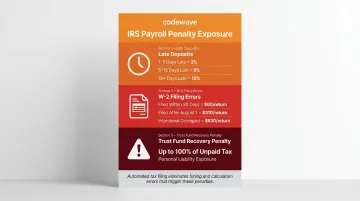
IRS Penalty Exposure Without Automation:
- Late deposits (1-5 days): 2% of unpaid amount
- Late deposits (6-15 days): 5% of unpaid amount
- Late deposits (16+ days): 10% of unpaid amount
- W-2 filing errors (within 30 days): $60 per return
- W-2 filing errors (after August 1): $310 per return
- Intentional disregard: $630/return, no maximum
The Trust Fund Recovery Penalty can equal 100% of unpaid trust fund tax and may be applied personally to responsible persons. Automating tax calculations and filing timing directly reduces this exposure.
Data Reconciliation
Bots compare payroll outputs against bank transaction records, time-sheet data, and general ledger entries in real time. Rather than requiring full manual audits, they surface discrepancies before they cascade. Flagged items typically fall into three categories:
- Amount mismatches between payroll output and bank transactions
- Missing entries where time-sheet data doesn't reconcile with ledger postings
- Timing gaps where deposits or deductions fall outside expected windows
Payslip Generation and Distribution
RPA generates and distributes payslips using standardized templates, ensuring consistency and creating a retrievable record trail for compliance. Administrative processing time typically drops 40-60% once payslip workflows are automated end-to-end.
Best Practices for Running Payroll RPA Effectively
Process First, Technology Second
The most consistent failure mode in payroll RPA is deploying bots before processes are fully documented and standardized. Automation amplifies whatever process it follows — including flawed ones. Organizations that clean up processes first see faster implementation and higher accuracy than those that automate existing inefficiencies.
Maintain a Hybrid Human-in-the-Loop Model
RPA handles high-volume rule-based tasks, but exceptions require clear escalation paths to human payroll professionals. Design this into the workflow from the start:
- Disputed pay queries requiring investigation
- Off-cycle adjustments outside standard processing
- Regulatory edge cases not covered by existing rules
- Retroactive calculations with complex dependencies
Bots flag these scenarios and route them to designated owners with context and supporting data. This structured handoff prevents exception cases from stalling in limbo — reducing both processing delays and downstream compliance exposure.
Treat Compliance as a Living Input
Tax laws, labor regulations, and benefit rules change constantly. 75% of global tax authorities are expected to enforce real-time or near-real-time payroll reporting by 2026. Schedule quarterly reviews of bot logic against regulatory updates. Assign clear ownership for this maintenance task within the payroll or HR team — not as an afterthought, but as a named role.
The Ponemon Institute found that non-compliance costs are 2.71 times higher than the cost of meeting compliance requirements. A defined maintenance cadence is far less expensive than regulatory penalties — and far easier to defend to auditors.
Conclusion
Implementing RPA for payroll is less about the technology itself and more about the discipline of documenting processes, sequencing deployment correctly, and maintaining bots over time. Organizations that treat RPA as a one-time setup consistently underperform those that treat it as an ongoing operational capability.
The highest payroll error rates stem from poor data quality, late inputs, and inconsistent processes—problems that automation exposes rather than fixes. Address these root causes first, then deploy RPA to lock in improvements at scale.
View payroll RPA not as a cost-cutting initiative in isolation, but as a foundation for freeing payroll teams to focus on compliance analysis, strategic planning, and employee experience: the outcomes that actually require human judgment. That shift only happens when implementation is done right—with proper process discovery, phased rollout, and ongoing bot maintenance built into the plan from day one.
Codewave supports organizations through that full lifecycle, from identifying the right payroll processes to automate to sustaining performance after go-live.
Frequently Asked Questions
What is robotic process automation in payroll?
RPA in payroll refers to software bots that mimic human actions within payroll systems—handling repetitive tasks like data entry, calculations, tax filings, and reconciliation. These bots execute faster and with fewer errors than manual processing, operating 24/7 without fatigue.
What payroll processes are best suited for RPA?
Rule-based, high-volume, and well-documented processes are the strongest candidates—including employee data updates, salary calculations, tax filing, payslip generation, and reconciliation. Exception-heavy or undocumented processes are poor fits and should be standardized before automation.
What are the 4 types of payroll systems?
The four main types are: (1) in-house manual payroll, (2) payroll software (on-premise or cloud), (3) outsourced payroll services, and (4) integrated HRIS-payroll platforms. RPA can augment any of these depending on documentation quality and integration readiness.
How long does it take to implement RPA in payroll?
Targeted single-process implementations typically take 6-10 weeks from process mapping to stable go-live. Enterprise-wide rollouts spanning multiple jurisdictions and systems generally run 12-16 weeks.
What are the biggest challenges in implementing RPA for payroll?
The top challenges are insufficient process documentation, poor data quality, resistance from payroll teams, and outdated bot logic when regulations change. Each is preventable—process mapping, early stakeholder buy-in, and a scheduled bot maintenance cycle address all four.
What is the best AI for payroll?
Modern payroll automation typically combines RPA for rule-based tasks with AI/ML layers for anomaly detection and exception handling. The right stack—whether UiPath, Automation Anywhere, or another platform—depends on your payroll complexity, system integrations, and scale.