Introduction
Accounts payable teams are under pressure from every direction. Invoice volumes keep climbing, manual data entry consumes hours that finance staff don't have, and approval bottlenecks quietly damage vendor relationships and cash flow visibility. At a certain scale, these problems don't get easier to manage — they compound.
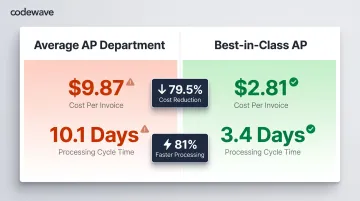
The measurable impact of RPA in AP shows up in daily operations: fewer exceptions requiring manual intervention, faster monthly close cycles, and finance teams redirected toward decisions that actually matter. Best-in-class AP departments process invoices 79.5% cheaper and 81% faster than their peers — that gap is almost entirely driven by automation.
This article breaks down what RPA actually delivers in accounts payable: lower cost per invoice, faster processing cycles, and a near-elimination of manual errors. It also covers what separates a sustainable implementation from one that stalls.
Key Takeaways
- RPA automates rule-based AP tasks (invoice capture, three-way matching, approval routing) without replacing existing systems
- Three measurable impacts: 79.5% lower cost per invoice, 81% faster processing cycles, and 60% fewer exceptions
- Automated AP departments process 3.8x more invoices per FTE—scaling volume without proportional headcount increases
- Value compounds only when workflows are integrated, KPIs are defined, and humans stay in the loop at key decision points
- Without automation, late payments and data errors quietly erode supplier trust and negotiating leverage over time
What Is RPA in Accounts Payable?
Robotic Process Automation (RPA) refers to software bots that mimic human actions within digital systems—logging into applications, extracting data from documents, cross-checking records against predefined rules, and triggering workflow steps—without requiring human input for each task. Gartner defines RPA as "software that automates tasks within business and IT processes using software scripts that emulate human interaction."
Where RPA Applies in AP
According to HighRadius research, the most common AP use cases for RPA include:
- Invoice data capture and entry (using OCR to extract data from PDFs, emails, and scanned documents)
- PO matching and validation (automatically cross-checking invoices against purchase orders and goods receipts)
- Approval routing (directing invoices based on amount, vendor, or department with automatic escalation)
- Vendor onboarding (processing registration forms and master data setup)
- Payment reconciliation (matching payments to invoices and updating ERP records)
- Exception flagging (identifying discrepancies for human review)
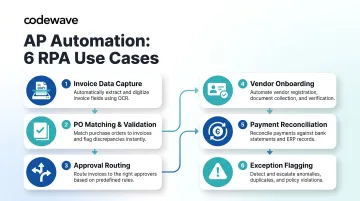
With 59.3% of all invoices linked to purchase orders, PO-based three-way matching represents one of the highest-volume automation opportunities across industries.
What RPA Is and Isn't
RPA's core value is reducing the manual work that slows AP cycles. It performs best on structured, rule-based tasks with predictable inputs: invoice data extraction, validation against business rules, and systematic routing.
Where it falls short is unstructured exceptions, judgment-intensive decisions, and highly variable vendor formats. Handling those scenarios typically requires supplemental AI capabilities on top of the base RPA layer.
Key Advantages of RPA in Accounts Payable
The following advantages tie directly to operational metrics AP and finance leaders actively track: cost per invoice, processing time, error rates, compliance posture, and team capacity. Each advantage is most powerful when RPA is applied to the right task—structured, repetitive, rule-driven processes—rather than forced into exception-heavy or judgment-dependent workflows.
Advantage 1: Faster Invoice Processing and Lower Cost Per Invoice
Manual invoice processing involves multiple handoffs: receipt, data entry, coding, verification, and routing. Each step adds time and labor cost. RPA collapses these into a continuous, near-instant workflow.
How It Works:
Bots extract invoice data using OCR technology for paper and PDF documents, validate against predefined business rules, code general ledger line items automatically, and push approved invoices directly to the ERP—all without human intervention for standard invoices.
Ardent Partners' 2024 research shows the cost gap clearly:
- Average cost to process a single invoice: $9.87
- Best-in-class cost: $2.81
- Best-in-class costs are 79.5% lower than average
Processing time gaps are equally dramatic:
- Average processing cycle: 10.1 days
- Best-in-class cycle: 3.4 days
- Best-in-class processing is 81% faster
The Business Case:
Faster processing directly enables capturing early payment discounts, avoiding late payment penalties, and improving cash flow visibility. Highly automated AP teams capture 85-95% of available early payment discounts versus just 58% for average departments. Standard 2/10 net 30 terms yield an annualized return of approximately 36.73% when captured—a significant financial outcome, not just an efficiency metric.
When AP cycles close faster, finance leadership receives more accurate and timely data for forecasting and working capital decisions. 65% of AP teams now partner with treasury to guide cash flow decisions, making processing speed strategically valuable.
KPIs Impacted:
- Invoice processing time (days to hours)
- Cost per invoice processed
- Early payment discount capture rate
- Days payable outstanding (DPO)
When to Apply This:
High-volume environments processing thousands of invoices monthly, multi-vendor or multi-location operations, and finance teams stretched thin across month-end close and operational work benefit most dramatically from processing speed improvements.
Advantage 2: Significantly Higher Accuracy and Stronger Fraud Prevention
Manual data entry introduces errors at every step: wrong amounts, duplicate invoices, and coding mismatches. These errors compound over time into reconciliation issues, audit findings, and financial losses from fraud.
How It Works:
Bots follow predefined rules with 100% consistency—performing three-way matching (invoice vs. PO vs. goods receipt) on every invoice, not just high-value ones, and flagging exceptions for human review rather than passing errors through.
Ardent Partners' research reveals the accuracy gap:
- Average invoice exception rate: 20.7% (roughly 1 in 5 invoices)
- Best-in-class exception rate: 11.1%
- Best-in-class rates are 60% lower than peers
In fact, 53% of AP teams cite invoice exceptions as their biggest operational challenge—the first time this topped the list in 19 years of tracking.
Fraud Prevention Impact:
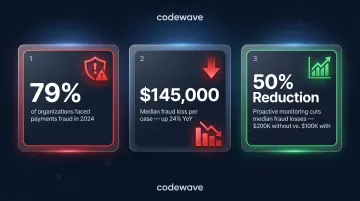
The fraud threat is real and growing. 79% of organizations were victims of attempted or actual payments fraud in 2024, with business email compromise (BEC) cited by 63% as the top fraud avenue. Median occupational fraud losses reached $145,000 per case in 2024, up 24% from 2022.
Automated controls make a measurable difference: proactive data monitoring and analysis reduces median fraud losses by 50% ($100,000 with monitoring vs. $200,000 without). Duplicate payments—which typically range from 0.1% to 0.5% of total payments but can reach 1.5%—represent up to $1.5 million in risk annually for companies processing $100 million in AP volume.
Strategic Value:
Every invoice matched automatically means AP teams are no longer selectively auditing due to capacity constraints—coverage is total. Accurate, consistent data improves audit readiness, reduces compliance risk, and gives leadership a reliable financial picture without manual reconciliation overhead.
KPIs Impacted:
- Error rate per invoice batch
- Duplicate payment rate
- Exception rate
- Audit findings
- Fraud incident frequency
When to Apply This:
Organizations processing invoices from many vendors in varied formats (paper, PDF, email), businesses with high regulatory scrutiny (healthcare, fintech, insurance), and those that have experienced fraud incidents or reconciliation failures gain the most value from automated accuracy controls.
Advantage 3: Scalability Without Proportional Headcount Growth
As businesses grow—adding vendors, expanding locations, increasing transaction volumes—AP workloads grow linearly, but team capacity does not. Manual processes force a choice between hiring more staff or accepting slower processing and mounting backlogs.
How It Works:
Bots can be scaled up (more instances, extended run hours, expanded to new workflow steps) without adding headcount. An AP operation processing 5,000 invoices monthly can handle 50,000 without proportional staffing increases.
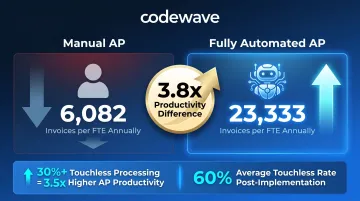
Fully automated AP departments process approximately 23,333 invoices per FTE annually versus 6,082 in nearly fully manual environments—a 3.8x difference.
The Hackett Group found that companies achieving 30% or higher touchless invoice processing realize 3.5 times higher AP productivity on average. Automation adopters achieved an average touchless processing rate of 60%, with cycle times improving by 59% following implementation.
Strategic Value:
Scalability directly supports business growth—M&A integration, new vendor onboarding, seasonal volume spikes—without creating operational bottlenecks in finance. This shifts AP from a cost that grows with revenue to one decoupled from transaction volume.
Staff freed from data entry can be redeployed to vendor relationship management, spend analytics, and financial planning—roles with direct strategic value. Best-in-class organizations spend over 50% less time responding to supplier inquiries, while non-automated departments spend 26.9% of their time managing these inquiries.
KPIs Impacted:
- Invoices processed per FTE
- Processing capacity without headcount increase
- Team utilization rate
- AP team time allocation (operational vs. strategic)
When to Apply This:
Growing businesses approaching volume thresholds, organizations undergoing M&A, and AP teams supporting multi-entity or multi-currency operations across geographies benefit most from scalable automation that doesn't require proportional headcount investments.
What Happens When AP Automation Is Ignored
Without automation, AP teams operate in permanent reactive mode. They chase approvals by email, manually resolve invoice discrepancies, and reconstruct audit trails from documents scattered across inboxes and filing systems. Closing the books on time becomes a scramble, and proactive cash management stays out of reach.
Cost Accumulation Over Time:
The cost gap between manual and automated processing compounds every cycle. At $9.87 per invoice versus $2.81, a department handling 10,000 invoices monthly absorbs an additional $70,600 per month ($847,200 annually) in avoidable processing costs.
Late payment penalties, missed early payment discounts, and duplicate payments compound these losses. Across international markets, 92% of financial decision-makers report paying suppliers late—and existing AP processes are consistently cited as the primary bottleneck.
Compounding Risk:
As invoice volumes grow without corresponding team scaling, error rates rise, exception handling slows, and vendor relationships deteriorate—creating a downward spiral where AP becomes a drag on business operations rather than an enabler. 49.7% of invoices are still received in manual format (paper, fax, PDF, email attachments), forcing manual processing workflows that can't keep pace.
Audit and Compliance Exposure:
Manual processes lack consistent documentation, making audit preparation labor-intensive and compliance risk harder to manage. 34% of businesses reported a business payment fraud attack over the past year, with 37% reporting that fraud attacks increased. Perhaps most concerning: 36% of AP teams were unable to answer with authority whether fraud attacks had increased or decreased—indicating limited visibility into their own exposure.
How to Get the Most Value from RPA in AP
RPA delivers maximum value when applied to tasks that are structured, rules-based, and high-volume. The following best practices ensure implementations deliver sustained operational improvements rather than stalled pilots.
Start With Process Selection
Ideal RPA candidates:
- Invoice data capture and extraction
- Three-way PO matching
- Approval routing based on clear business rules
- Payment reconciliation against bank statements
- Routine reporting and dashboard updates
Avoid applying RPA to exception-heavy or judgment-dependent workflows without pairing it with AI-based decision logic. Process fragmentation is the biggest barrier to scaling RPA, cited by 32% of executives—standardize processes before automating them.
Emphasize Consistent Monitoring and Optimization
Deploy with clear KPIs from day one:
- Processing time (invoice receipt to payment)
- Error rate and exception frequency
- Cost per invoice
- Touchless processing rate
Review bot performance regularly and update rules as vendor formats or business workflows change. Bots that aren't maintained drift out of accuracy over time. Gartner's Finance RPA guidance emphasizes connecting RPA to larger business objectives rather than focusing solely on "hours saved."
Build in Human Checkpoints for Exceptions
The most effective AP automation implementations use:
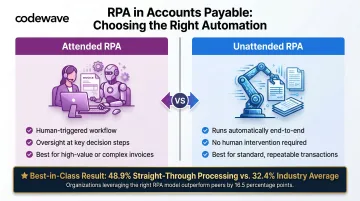
- Attended RPA (human-triggered with oversight at key decision points) for high-value or complex invoices
- Unattended RPA (runs automatically end-to-end) for standard, repeatable transactions
This balance preserves control without sacrificing throughput. Best-in-class organizations process more than twice as many invoices in a straight-through manner as peers, achieving 48.9% straight-through processing rates versus 32.4% average.
Integrate With Existing ERP and Financial Systems From the Start
RPA works best when bots share data in real-time with the ERP—siloed automation creates reconciliation work downstream. Ensure integration is validated before full deployment.
That integration requirement is where implementation partners matter. Codewave connects AP automation with major ERP systems including SAP, Oracle, NetSuite, and Microsoft Dynamics, keeping data in sync across systems in real time.
For organizations looking to move from concept to live deployment quickly, Codewave's QuantumAgile™ methodology moves from idea to validated outcomes in days. It simulates and stress-tests automation flows before shipping, cutting the typical months-long implementation risk down considerably.
Conclusion
RPA in accounts payable delivers compounding value across cost, accuracy, and scalability, but only when applied with discipline: the right tasks, consistent monitoring, ERP integration, and human oversight at critical decision points.
Well-implemented AP automation lets organizations scale invoice volumes without adding headcount, maintain audit readiness, and free the AP team for work that requires genuine judgment. For organizations processing thousands of invoices monthly, the math is straightforward: best-in-class departments achieve 79.5% cost reduction and 81% speed improvement through automation.
The longer manual processing continues, the more those compounding costs grow alongside volume.
For organizations that want automation outcomes tied to measurable business results rather than just technology deployment, Codewave's ImpactIndex™ model delivers exactly that—clients pay for measurable results, with every engagement benchmarked against real operational impact.
Frequently Asked Questions
What is robotic process automation in accounts payable?
RPA uses software bots to automate rule-based, repetitive tasks within AP workflows—such as invoice data entry, three-way matching, and approval routing—by mimicking human interactions with existing systems without requiring IT changes or system replacements.
What is the role of automation in accounts payable?
Automation transforms AP from a manual, error-prone function into a controlled, efficient process. It cuts processing times from days to hours, eliminates data entry errors, enforces approval policies consistently, and gives finance teams real-time visibility into invoice and payment status for stronger cash flow management.
What are the 4 stages of process automation?
The four typical stages are:
- Data extraction and capture — collecting invoice and document data at intake
- Processing and validation — cross-checking against rules and existing records
- Decision-making — routing, approving, or flagging based on defined logic
- Integration and execution — updating ERP records and triggering payments
What are the three types of RPA?
The three types differ by where human involvement occurs:
- Attended RPA — triggered or overseen by a human; best for high-value invoice approvals
- Unattended RPA — runs end-to-end automatically; best for routine data entry and reconciliation
- Hybrid RPA — combines both, handing off between automated and human-assisted steps based on complexity
What does RPA stand for in payroll?
RPA stands for Robotic Process Automation across all finance functions, including payroll. In payroll contexts, it automates tasks like timesheet data entry, payroll calculation validation, and payment processing.
What accounts payable tasks are best suited for RPA?
RPA performs best on structured, high-volume, rules-based tasks: invoice capture and data extraction, three-way PO matching, approval routing, vendor onboarding data entry, payment reconciliation, and routine reporting—tasks with consistent inputs, clear rules, and minimal requirement for contextual judgment.