The good news? Digital transformation isn't reserved for enterprises with million-dollar IT budgets. Small businesses actually have a structural advantage: fewer legacy systems, faster decision-making, and the ability to implement changes without navigating layers of bureaucracy. This guide shows you the high-impact areas to target first, a realistic roadmap that won't overwhelm your team, and how to measure whether your investment is actually working.
Key Takeaways
- Digital transformation means adopting the right technology to improve operations and customer experience, not rebuilding everything from scratch
- Start with process automation, customer data management, and cloud operations for fastest ROI
- Use a phased approach: assess bottlenecks, set measurable goals, and implement in 90-day sprints to avoid wasted spend
- Track reductions in processing time, error rates, and overhead costs as early proof of ROI
- The biggest risk isn't moving too fast—it's falling behind as competitors adapt and customer expectations move on
What Digital Transformation Actually Means for Small Businesses
Digital transformation happens in three distinct stages, and knowing where you currently sit matters:
Digitization converts paper to digital formats—scanning invoices instead of filing them, storing contracts in Google Drive instead of a filing cabinet.
Digitalization uses digital tools to improve existing processes—automating invoice reminders, using a scheduling tool instead of phone tag.
Digital transformation changes the underlying model of how you create and deliver value—using customer data to personalize marketing, automating entire workflows from lead capture to follow-up, or enabling customers to self-serve through a portal.
Most small businesses are fully digitized but only partially digitalized. The shift to true transformation happens when you stop asking "how do we do this task faster?" and start asking "should we be doing this task at all?"
The Small Business Advantage
Contrary to the myth that digital transformation is "for big companies," small businesses often transform faster and more successfully than enterprises. When you decide to implement a CRM or automate your accounting, you can be live in weeks, not quarters.
You don't have decades-old ERP systems that cost millions to replace, departments fighting over budgets, or compliance frameworks requiring 18-month approval cycles. That's a genuine structural advantage.
Here's what that difference looks like in practice:
| Traditional | Transformed | |
|---|---|---|
| Order capture | Phone call, written in a notebook | Customer self-serves on your website |
| Data entry | Manual entry into accounting system | CRM captures and syncs automatically |
| Confirmation | Manual email | Triggered instantly on order completion |
| Inventory | Separate spreadsheet update | Updated in real time |
| Follow-up | Ad hoc or forgotten | Automated emails at day 3, 7, and 30 |
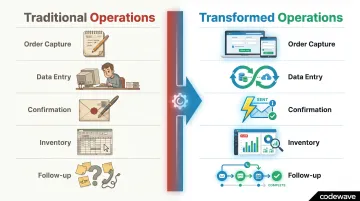
The difference isn't just time saved — it's data quality, customer experience, and the ability to see exactly which products are selling without digging through spreadsheet rows.
The Real Cost of Staying Analog
Choosing not to digitally transform isn't a neutral decision—it's an active cost that compounds monthly.
Small businesses classified as "Digital Natives" grow revenue 8x faster than "Digital Indifferent" businesses (3.2% vs. 0.4% annual growth), according to Cisco and IDC's 2020 study of over 2,000 small businesses. Only 4% of SMBs globally have reached that advanced digital maturity stage. The gap isn't just about technology—it's about what technology enables: faster decisions, better customer experiences, and the ability to operate efficiently without adding headcount.
Hidden Costs You're Already Paying
Manual processes aren't free. The average entrepreneur spends 36% of their work week on administrative tasks—invoicing, data entry, ordering supplies, scheduling. For a business owner working 50 hours a week, that's 18 hours consumed by tasks that could be automated.
Translate that to annual cost: 18 hours/week × 50 weeks × $50/hour average small business wage = $45,000 in opportunity cost per year. That doesn't include the revenue you didn't generate because you were stuck in spreadsheets instead of talking to customers.
The time drain is only part of the picture. According to the National Small Business Association, accounting errors result in an average of $3,534 per year in tax overpayments for small businesses. Factor in missed customer follow-ups, lost files, and the inability to work remotely, and the "savings" from staying analog disappear fast.
Customer Expectations Have Shifted
Your customers now expect speed, self-service, and personalization—because that's what digital-native companies trained them to expect. Salesforce's 2022 State of the Connected Customer report found:
- 88% of customers say experience is as important as the product itself
- 83% expect immediate interaction when they contact a company
- 71% switched brands at least once in the prior year — 48% specifically for better customer service
If you can't respond quickly, track customer history, or offer self-service options, you're handing customers a reason to leave. Digital-native startups enter established markets with lower overhead and better experiences because they built operations around modern tools from day one—and that's an advantage any business can replicate.
Five High-Impact Areas Where Small Businesses Transform First
You don't transform everything simultaneously. The highest ROI comes from targeting specific, high-impact areas in order of implementation ease and speed of return.
Operations and Process Automation
Automating repetitive, rule-based tasks—invoicing, appointment scheduling, order processing, payroll—frees staff time for higher-value work. A UK retail company processing several hundred invoices per month implemented AI-driven automation and reduced processing time by 80%—from 10-15 minutes per invoice to under 3 minutes. They saved over 40 staff hours per month, which were redirected to customer service and inventory management.
For businesses implementing outcome-focused automation, results like **50% faster invoice processing** and 3 weeks saved per month in manual data work are achievable within the first 90 days. The ROI is immediate: less time on administrative work means more time on revenue-generating activities.

Quick wins to target first:
- Invoice generation and payment reminders
- Appointment scheduling and calendar management
- Order confirmation and shipping notifications
- Expense tracking and report generation
Customer Data and CRM
Centralizing customer data in a CRM system enables personalized communication, reduces lost leads, and improves repeat business. Unlike spreadsheets, a CRM sends automated follow-ups, tracks which emails were opened, and alerts you when a high-value customer hasn't purchased in 60 days.
Centralizing customer data in a CRM system enables personalized communication, reduces lost leads, and improves repeat business. Unlike spreadsheets, a CRM sends automated follow-ups, tracks which emails were opened, and alerts you when a high-value customer hasn't purchased in 60 days.
CRM systems deliver an average ROI of $8.71 for every $1 spent, according to Nucleus Research. Cloud CRM deployments deliver 1.7x more ROI than non-cloud systems. For small businesses, CRM adoption directly impacts customer retention rates, increasing retention by up to 27% according to industry data.
Affordable CRM options for SMBs:
- HubSpot CRM (free forever for unlimited users): Contact management up to 15M contacts, email tracking (200/month), meeting scheduler, basic automation
- Zoho CRM (free for 3 users): Leads, deals, workflows, 10 email templates, mobile app, 5,000 record limit
- Freshsales (free for 3 users): Contact/account management, built-in chat/email/phone, basic reporting
Metrics to track: Customer retention rate, lead conversion rate, average response time, repeat purchase rate.
Cloud Infrastructure and Remote Operations
Moving from on-premise hardware to cloud-based tools eliminates upfront infrastructure costs, enables remote work, and provides scalable storage and computing. Businesses migrating to cloud infrastructure realize an average 31% cost savings and run IT infrastructure 62% more efficiently, according to IDC research.
The reliability gains are just as significant. Businesses experience a 69% reduction in unplanned downtime post-migration — fewer "sorry, our system is down" moments and the ability to operate from anywhere with internet access.
Practical cloud moves:
- Replace local file servers with Google Workspace or Microsoft 365
- Move accounting to QuickBooks Online or Xero
- Use cloud backup (Backblaze, Carbonite) instead of external hard drives
- Implement cloud-based project management (Asana, Monday.com, ClickUp)
Digital Marketing and Sales Enablement
Even basic digital marketing—an SEO-optimized website, email automation, social media scheduling—gives small businesses a measurable reach that was previously cost-prohibitive. The data these channels generate (open rates, click-throughs, conversion rates) creates a feedback loop that improves spend efficiency over time.
Businesses with websites are 2.8x more likely to grow revenues than those without, according to Google and Deloitte research. That gap widens when you add email automation, retargeting ads, and content marketing to the mix.
High-ROI digital marketing investments:
- Website with clear calls-to-action and mobile optimization
- Email marketing automation (welcome sequences, abandoned cart reminders)
- Social media scheduling tools (Buffer, Hootsuite)
- Basic SEO (Google Business Profile, local directory listings, keyword-optimized content)
Finance and Reporting Automation
Cloud accounting and automated reporting tools replace manual bookkeeping, reduce errors, and give you real-time financial visibility. Instead of waiting until month-end to know if you're profitable, you see cash flow, expenses, and revenue as they happen.
Businesses implementing finance automation achieve 90% fewer data errors and 40% less time spent on reporting. Transposed numbers, duplicate entries, and missed invoices disappear when systems exchange data automatically.
Core finance automation tools:
- Cloud accounting platforms (QuickBooks Online, Xero, FreshBooks)
- Automated expense tracking (Expensify, Dext)
- Payment processing integration (Stripe, Square)
- Automated invoicing and payment reminders
A Practical Step-by-Step Digital Transformation Roadmap for Small Businesses
This roadmap is designed to minimize disruption, control spend, and build internal confidence through small wins—not a risky, expensive overhaul. Each phase has a clear, measurable outcome before you move to the next.
Step 1: Audit Your Current State
Start with a simple digital maturity self-assessment:
- List current tools: What software and systems are you already using? (Email, accounting, website, spreadsheets, paper files)
- Map manual processes: Which business processes are still paper-based or completely manual? (Customer intake, invoicing, reporting, inventory tracking)
- Identify top three bottlenecks: What costs the most time or money? Ask frontline employees—they often spot inefficiencies management doesn't see
Example: A small consulting firm discovered they spent 12 hours/week manually creating client reports from data that already existed in three different systems. That bottleneck became their first automation target.
Step 2: Define Measurable Goals Before Selecting Tools
The most common cause of wasted digital spend is choosing technology before defining the problem. Frame goals in measurable terms:
Vague goal: "Improve our finance processes"
Measurable goal: "Reduce invoice processing time from 3 days to same-day"
Vague goal: "Better customer communication"
Measurable goal: "Respond to customer inquiries within 2 hours instead of 24 hours"
This goal-first approach is the foundation of outcome-based models like Codewave's ImpactIndex™, where solutions are built to deliver specific, trackable business results — not just feature lists. Define success upfront, and you can measure whether the investment actually delivered.
Step 3: Prioritize by Impact and Implementation Ease
Score potential transformation initiatives on a simple matrix:
| Initiative | Business Impact (High/Low) | Implementation Effort (Easy/Hard) | Priority |
|---|---|---|---|
| CRM for lead tracking | High | Easy | Do First |
| Automated invoicing | High | Easy | Do First |
| Custom mobile app | High | Hard | Do Later |
| New website design | Low | Easy | Do Later |
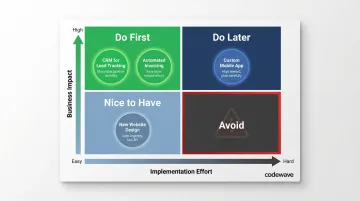
Start with high-impact, easy-to-implement wins. These build momentum and demonstrate ROI quickly to the wider team.
Step 4: Implement in 90-Day Sprints
Recommend a phased rollout with 90-day cycles:
- Pick one or two initiatives per cycle (not five)
- Implement with clear milestones and checkpoints
- Measure results against your defined goals
- Decide whether to scale, optimize, or pivot based on actual data
The 90-day sprint structure pairs well with frameworks like QuantumAgile™, which simulate multiple implementation scenarios so small businesses can validate ideas fast and commit budgets only to approaches backed by real feedback.
Step 5: Train, Adopt, and Iterate
Technology adoption is a people problem as much as a technology one. Projects with excellent change management are 6x more likely to meet or exceed objectives, according to Prosci research.
Adoption strategies that work:
- Identify digital champions: Find 1-2 employees excited about the change who can advocate internally
- Communicate clearly: Explain why the change matters and what's in it for them (less tedious work, faster processes)
- Create short feedback loops: Let employees flag friction weekly before it becomes resistance
- Train hands-on: Use real scenarios, not generic tutorials
Companies offering comprehensive training programs report 218% higher income per employee and 24% higher profit margins, according to ATD research. That makes training one of the highest-return line items in any transformation budget.

Measuring Real Returns: The Metrics That Actually Matter
Many small businesses complete digital transformation initiatives without ever confirming whether they worked — because they never defined success upfront. The five areas covered above each have measurable outcomes. Here's a practical ROI tracking framework to capture them.
Operational Metrics
Track these KPIs:
- Task completion time (before vs. after automation)
- Error rates in data entry and processing
- Hours saved per week on manual processes
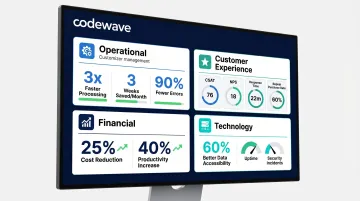
Based on Codewave's client outcomes, businesses that commit to process automation typically see 3X faster data processing, roughly 3 weeks saved per month in manual data work, and a 90% reduction in data errors.
Customer Experience Metrics
Monitor these numbers monthly:
- Customer satisfaction score (CSAT)
- Net Promoter Score (NPS)
- Average response time
- Repeat purchase rate
A CRM plus automated follow-ups can directly move these numbers within 60-90 days. For example, setting up a 3-email welcome sequence for new customers and a 30-day re-engagement email for inactive customers often increases repeat purchase rates by 15-20% in the first quarter.
Financial Metrics
Watch these figures closely:
- Cost per transaction (before/after automation)
- Overhead reduction percentage
- Revenue per employee
With focused effort over 6-12 months, realistic targets are a 25% reduction in costs and 40% increase in productivity — numbers Codewave's ImpactIndex™ model is specifically designed to track and deliver against.
Technology Performance Metrics
Track these KPIs:
- System uptime
- Data accessibility (time to retrieve needed information)
- Security incidents
Moving to cloud-based systems typically delivers a 60% improvement in data accessibility — meaning you can find the information you need in seconds instead of minutes or hours.
Building a Simple Measurement Dashboard
Create a one-page dashboard tracking 6-8 KPIs across these categories, reviewed monthly. A practical starting set:
- Hours saved per week (Operational)
- Repeat purchase rate (Customer Experience)
- Cost per transaction (Financial)
- Data retrieval time (Technology)
Reviewing these monthly turns the dashboard into a decision tool — each meeting surfaces where effort is paying off and where the next investment makes sense.
Common Pitfalls That Derail Small Business Digital Transformation
Tool Overload and Poor Integration
Purchasing disconnected software creates data silos and doubles manual work. Small businesses use an average of 242 SaaS applications, according to Productiv's 2021 study—68% of which aren't managed by IT. Many don't integrate, forcing employees to enter the same customer data into the CRM, accounting system, and email platform separately.
Solution: Build an integrated tech stack where tools share data. Choose platforms with open APIs and native integrations. Five tools that share data will outperform fifteen isolated ones every time.
Skipping the Change Management Layer
Technical implementation without adequate employee preparation is the most common reason digital transformation fails—even when the technology is the right choice. Nearly 70% of digital transformations fail to reach their stated goals, with the primary barriers being employee resistance and lack of management support rather than technology failures, according to McKinsey research.
Solution: The fix is cultural, not technical. Involve employees before rollout, not after. Run hands-on training sessions tied to their specific workflows. Celebrate early wins publicly so adoption builds momentum rather than resentment.
Confusing Activity with Transformation
Automating a broken process doesn't fix it—it just makes mistakes faster. If your invoicing process has seven approval steps and three reviewers per invoice, automation just accelerates the bottleneck.
Redesign before you automate. The right question isn't "how do we automate what we're already doing?" — it's "what's the simplest path to the outcome we need?"
Across all three pitfalls, the pattern is the same: technology exposes weak foundations rather than fixing them. Here's a quick reference for avoiding each one:
- Tool overload → Audit your current stack before adding anything new; prioritize integration over features
- Change resistance → Run pilot groups with real users before full rollout; gather feedback early
- Process automation → Map the ideal workflow first, then select tools to support it
Frequently Asked Questions
How much does digital transformation typically cost for a small business?
Cost varies widely by scope—from a few hundred dollars per month for SaaS tools like CRM and cloud accounting to tens of thousands for custom development. Start with high-impact, low-cost wins (automating invoices, implementing a free CRM tier) to prove ROI before committing larger budgets.
How long does digital transformation take for a small business?
Initial high-impact changes can show measurable results within 60-90 days—faster invoice processing, improved customer response times, reduced manual data work. Full business-wide transformation is an ongoing 12-24 month journey.
What is a realistic ROI for small business digital transformation?
Measurable returns include 25-40% cost reductions, significant time savings on manual processes (3 weeks/month or more), and improved error rates (90% reduction). ROI timelines depend on which areas are transformed and how clearly success metrics were defined upfront — most businesses see initial proof within the first quarter.
Where should a small business start its digital transformation?
Start with a process audit to identify the single biggest time or cost drain—the one bottleneck costing the most hours or creating the most errors. Target that with a focused tool or automation before expanding. Don't try to transform everything at once.
Can small businesses transform digitally without a dedicated IT team?
Yes. Most modern SaaS tools are designed for non-technical users with intuitive interfaces and built-in support. Small businesses can supplement limited internal expertise by working with external partners or consultants for initial setup and strategy without hiring full-time IT staff.
What is the difference between digitization and digital transformation?
Digitization converts paper to digital formats (scanning invoices). Digitalization uses digital tools to improve existing processes (automating invoice reminders). Digital transformation rebuilds how the business operates end-to-end (automated end-to-end workflows that eliminate entire manual processes).